SSTV Image Comparison
The quality of a received Slow-scan television (SSTV) picture may be determined by comparing, pixel-by-pixel, for identical matches in RGB color space. Upload the original transmitted image and one or more received images to calculate a quality percentage.
Example
Or save the images below to your computer and upload them yourself using the form at the top of the page.
The SSTV image below was transmitted from Spain and received in Wisconsin on 14.230 MHz. A pixel-by-pixel comparison of image quality was calculated using the Absolute Error metric. A 10% fuzz factor was applied, meaning pixels were deemed to match if the RGB color space of the degraded image was within 10% of the original.
The application dynamically computes results in your browser using the Canvas API to perform pixel-by-pixel comparison. Results may differ slightly from the server-side PHP version which uses ImageMagick, due to differences in JPEG decoding and color distance calculation between browser engines and ImageMagick versions. What matters is consistency within a single environment, not cross-environment reproducibility. See ImageMagick6 Discussion #234 for details.
 TX: EA3EWO_TX.jpg
|
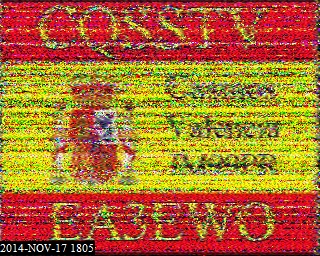 RX: EA3EWO_RX.jpg
|
Requirements
- At least two files are required: the original transmitted image and one or more received images.
- Images must be identical in size, e.g., 320x256 pixels.
- Supported formats: BMP, GIF, JPEG, PNG, TIFF.
- Maximum file size: 500 KB.
How It Works
If a ham radio operator received an image perfectly, there would be a 100% match. However, with analog transmissions this will never happen. Considerable image degradation occurs as soon as the software (e.g., MMSSTV) readies the image for transmission, and losses are magnified as the signal encounters path loss moving through the ionosphere.
This application runs entirely in your browser — no server or software installation required. It uses the
HTML5 Canvas API
to load each image, draw it to an off-screen canvas, and extract the raw RGBA pixel data via
getImageData(). Each pixel is represented as four 8-bit values (red, green, blue, alpha), ranging from 0 to 255.
For each pair of pixels between the TX and comparison image, the application calculates the Euclidean distance in RGB color space:
distance = sqrt((R1−R2)² + (G1−G2)² + (B1−B2)²)This distance is compared against a fuzz threshold derived from the maximum possible distance between any two RGB colors:
threshold = (fuzzPercent / 100) × 255 × sqrt(3)Where 255 × sqrt(3) ≈ 441.67 is the maximum Euclidean distance in 8-bit RGB space
(the distance from pure black (0,0,0) to pure white (255,255,255)).
A pixel is counted as "different" (an absolute error) only if its distance exceeds the threshold.
The total count of different pixels across the entire image is the
Absolute Error
(AE) metric. The ratio of matching pixels to total pixels is expressed as a percentage, serving as a measure of received picture quality.
A fuzz adjustment matches colors that are close to the target in RGB space — colors within this distance are considered equal. From experimentation, 10% may be a useful fuzz tolerance level for expressing the quality of a received image. All images are compared to the first (TX) image, including itself; the TX image compared to itself will result in 100% identity at all fuzz thresholds.
Differences from the Server-Side PHP Version
A server-side PHP version of this tool uses ImageMagick for comparison. Results between the two versions will differ for several reasons:
- JPEG decoding — Browsers and ImageMagick use different JPEG decoders (e.g., libjpeg-turbo vs. the browser's built-in decoder). The same JPEG file can decode to slightly different pixel values, affecting all fuzz levels including 0%.
- Fuzz distance formula — This JavaScript version uses Euclidean distance in RGB space. ImageMagick's internal fuzz calculation has changed across versions (notably between 6.9.11-34 and 6.9.11-35), and may use a different distance formula or colorspace internally.
- Color management — Browsers may apply color profile conversions (sRGB) when decoding images. ImageMagick's color management behavior depends on its build configuration and policy settings.
Neither set of results is more "correct" than the other. What matters is consistency within a single environment. See ImageMagick6 Discussion #234 for details on cross-version differences.
Acknowledgements
- Larry Peterson (WA9TT) — Program conceptual design and testing
- Terry Cooling (EA3EWO) — Testing
- Matthew Peterson — github.com/petersm3/sstvcompare